Want to save YouTube thumbnails quickly and easily without the need to install any additional app or software? You’re definitely in the right place for that. This comprehensive guide walks you through simple, safe, and fast methods to download YouTube thumbnails directly from your web browser by using convenient online tools such as WeenyTools YouTube Thumbnail Downloader. These user-friendly methods are fully compatible and work flawlessly on both desktop and mobile devices, supporting popular browsers including Chrome, Firefox, Safari, and many others.
We will cover every possible method in detail, ranging from the most basic right-click options that anyone can use, to more advanced URL manipulation techniques that provide additional ways to save thumbnails efficiently. This comprehensive guide ensures that you can save thumbnails quickly and effectively without the need to install or rely on any third-party applications or software tools.
Why Save YouTube Thumbnails Without Apps?
There are several clear and significant advantages to saving thumbnails without using any additional apps. By doing so, you avoid the need for unnecessary downloads that can clutter your device with unwanted software. This approach also helps protect your privacy by minimizing the amount of personal data shared with third-party applications. Furthermore, it allows you to save valuable storage space on your device, ensuring that you have more room available for important files and other essential apps.
- Save Storage: No need to install large or unverified apps.
- Better Security: Avoid potential malware or risky third-party tools.
- Instant Access: Works on any browser without setup.
- Cross-Platform: Compatible with Windows, macOS, Linux, Android, and iOS.
- Always Up-to-Date: Browser-based tools like WeenyTools stay updated automatically.
Method 1: Direct Browser Right-Click (Basic)
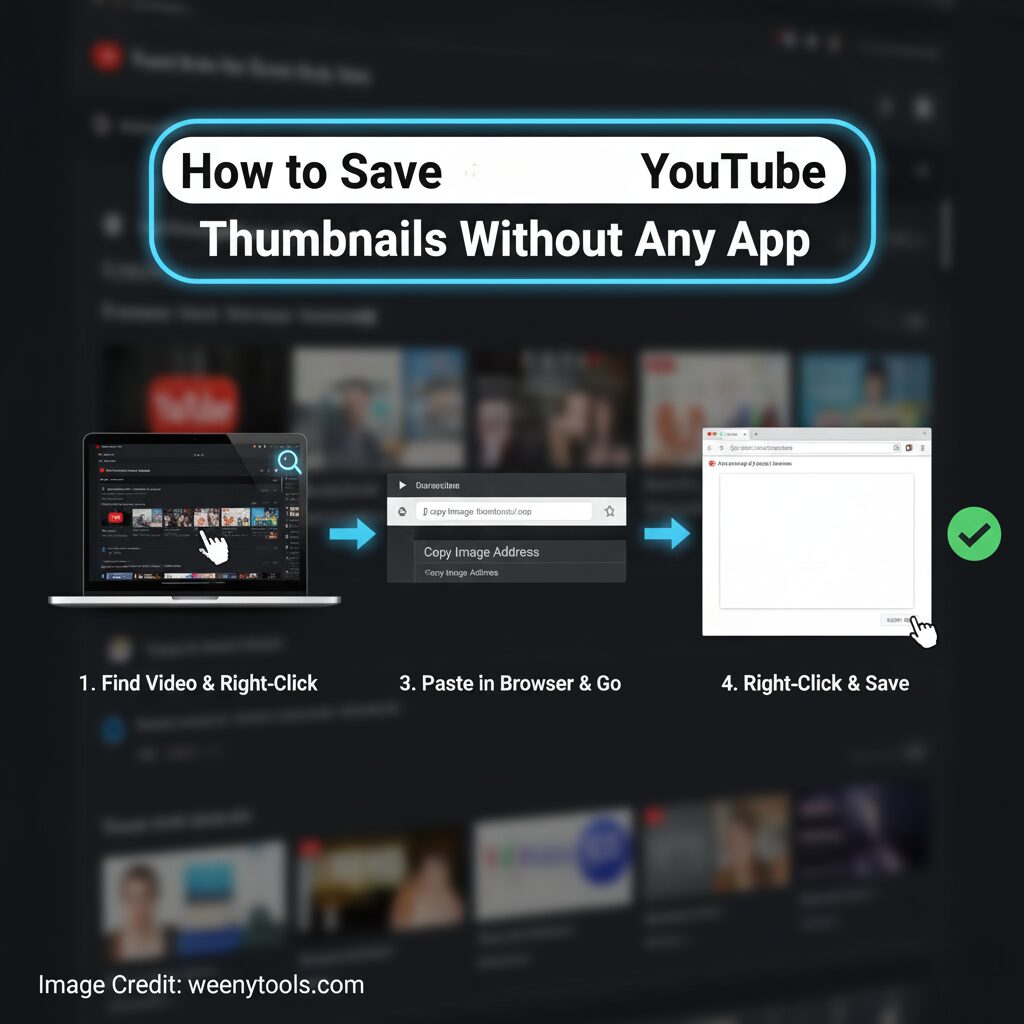
The simplest and most straightforward way to save a YouTube thumbnail is by utilizing your web browser’s built-in right-click context menu feature. This method allows you to quickly and easily download the thumbnail image without needing any additional software or tools.
🖱️ Steps:
- Open the YouTube video in your browser.
- Right-click on the video thumbnail.
- Select “Save image as…” or “Download image.”
- Choose a folder to save the file.
⚠️ Limitations:
- Usually saves low-resolution images (120×90 pixels).
- Not all thumbnails can be accessed this way.
- Only works for visible images on the screen.
Method 2: Use WeenyTools Downloader (Recommended)
The most effective and convenient method to save YouTube thumbnails is by utilizing the WeenyTools YouTube Thumbnail Downloader. This tool is incredibly fast, completely free to use, and supports downloading thumbnails in multiple resolutions, including high-quality options up to 4K. It makes the entire process simple and efficient for users looking to quickly obtain YouTube thumbnail images.
🚀 How It Works:
- Visit WeenyTools Thumbnail Downloader.
- Copy and paste your YouTube video URL into the input box.
- Click “Get Thumbnails.”
- Preview available resolutions (240p to 4K).
- Download your preferred size in JPG or PNG format.
✅ Advantages of WeenyTools:
- Supports up to 4K resolution (maxresdefault.jpg).
- No app or sign-up required.
- Clean, ad-light interface.
- Fast thumbnail generation.
- Works on all devices.
Method 3: Browser Developer Tools (Advanced)
If you enjoy exploring various browser tools and diving into the technical aspects of web pages, you can manually extract thumbnails by using the “Inspect Element” feature available in most modern browsers. This method allows you to directly access and retrieve thumbnail images embedded within the webpage’s code.
- Open the YouTube video.
- Press F12 or right-click and select “Inspect.”
- Locate the image element inside the page source.
- Right-click → Copy → Copy Image Address.
- Open the copied link in a new tab and save the image.
Method 4: Manual URL Construction
YouTube employs a straightforward URL format specifically designed for its video thumbnails. This URL structure is quite simple and user-friendly, allowing you to access thumbnails easily. You can manually use this URL format by simply replacing the video ID portion with the specific ID of the video whose thumbnail you want to retrieve. This method provides a quick and efficient way to get the thumbnail image directly from YouTube.
Base URL: https://img.youtube.com/vi/VIDEO_ID/QUALITY.jpg
Example: https://img.youtube.com/vi/dQw4w9WgXcQ/maxresdefault.jpg
| Quality | File Name | Resolution |
|---|---|---|
| Default | default.jpg | 120×90 |
| Medium | mqdefault.jpg | 320×180 |
| High | hqdefault.jpg | 480×360 |
| Standard | sddefault.jpg | 640×480 |
| Max (HD) | maxresdefault.jpg | 1280×720 |
| Ultra HD / 4K | maxresdefault.jpg | 3840×2160 |
Comparing All Methods
| Method | Ease | Quality | Speed |
|---|---|---|---|
| Right-Click | Easy | Low | Instant |
| WeenyTools Downloader | Very Easy | High (4K) | Fast |
| Developer Tools | Medium | Good | Moderate |
| URL Method | Hard | Excellent | Moderate |
Legal and Ethical Notes
Always make sure to carefully follow copyright laws as well as YouTube’s fair use policies when saving or downloading thumbnails from the platform. The images you download should be used strictly for personal enjoyment, research projects, or educational purposes only. If you intend to use these thumbnails for any type of commercial or business-related activity, it is important to first obtain explicit permission from the original creator or copyright holder before proceeding.
For additional information and comprehensive details, please take a moment to read through our Terms & Conditions, as well as our Privacy Policy. We also encourage you to review our Disclaimer and our DMCA Policy to fully understand our guidelines and your rights.
Troubleshooting Common Issues
Right-Click Not Working?
- Try reloading the video.
- Disable browser extensions blocking image saving.
- Use the WeenyTools Downloader instead.
Low-Quality Images?
- Some videos lack high-res thumbnails.
- Try “maxresdefault.jpg” URL.
- Use our downloader for the best available version.
Conclusion
Saving YouTube thumbnails without the need for any additional app is not only simple but also safe and incredibly fast. The WeenyTools YouTube Thumbnail Downloader provides the most reliable and user-friendly method to quickly access YouTube thumbnails in all the available resolutions, covering everything from standard quality up to HD and even stunning 4K resolution options.
Whether you’re focused on studying thumbnail design, conducting in-depth marketing analysis, or simply saving various pieces of artwork, these methods work perfectly well without the need to install any extra applications or software. You can conveniently access all the tools and resources directly from your web browser, allowing you to keep your device clean, organized, and free from unnecessary clutter. This approach not only saves storage space but also enhances your workflow efficiency by enabling quick and easy access anytime, anywhere.
For more guides, visit our FAQ or Contact Us.
Start Saving YouTube Thumbnails
Use the completely free and easy-to-use WeenyTools Thumbnail Downloader right now. There is no need to install any apps, no sign-ups required, just quick, safe, and reliable downloads every time. Experience a hassle-free process with this tool.Download YouTube Thumbnails with ease and convenience today.